
Networking
Hutch Security Systems installs network cabling, switches, patch panels and WiFi access points for homes and businesses in Kitchener, Waterloo, Cambridge, Milton and Guelph. A security system is only as reliable as the network under it, so we build the cabling and switching that keeps every camera, panel, reader and computer connected and stable.
The network your security system runs on.
Networking is the cable in the walls and ceilings, the patch panels it lands on, the switches that power and connect each device, and the WiFi access points that cover the building. Done well, it is invisible: cameras stay online, card readers respond and the WiFi reaches the back of the warehouse. Done badly, it is the reason a camera drops out every afternoon.
We do networking on its own and as part of camera, card access and intercom installs. Businesses come to us for a new office, a renovation, a warehouse with dead WiFi or a network closet that has grown into a tangle. Homeowners usually want reliable WiFi through the whole house and a wired connection to every camera.
How a networking job runs.
Walkthrough
We look at the building with you, find where the network equipment should live, and map every drop: cameras, readers, desks, TVs and access points.
Design and quote
You get the number of cable runs, the switch and the access points, priced in plain terms before anything is ordered.
Cable and rack
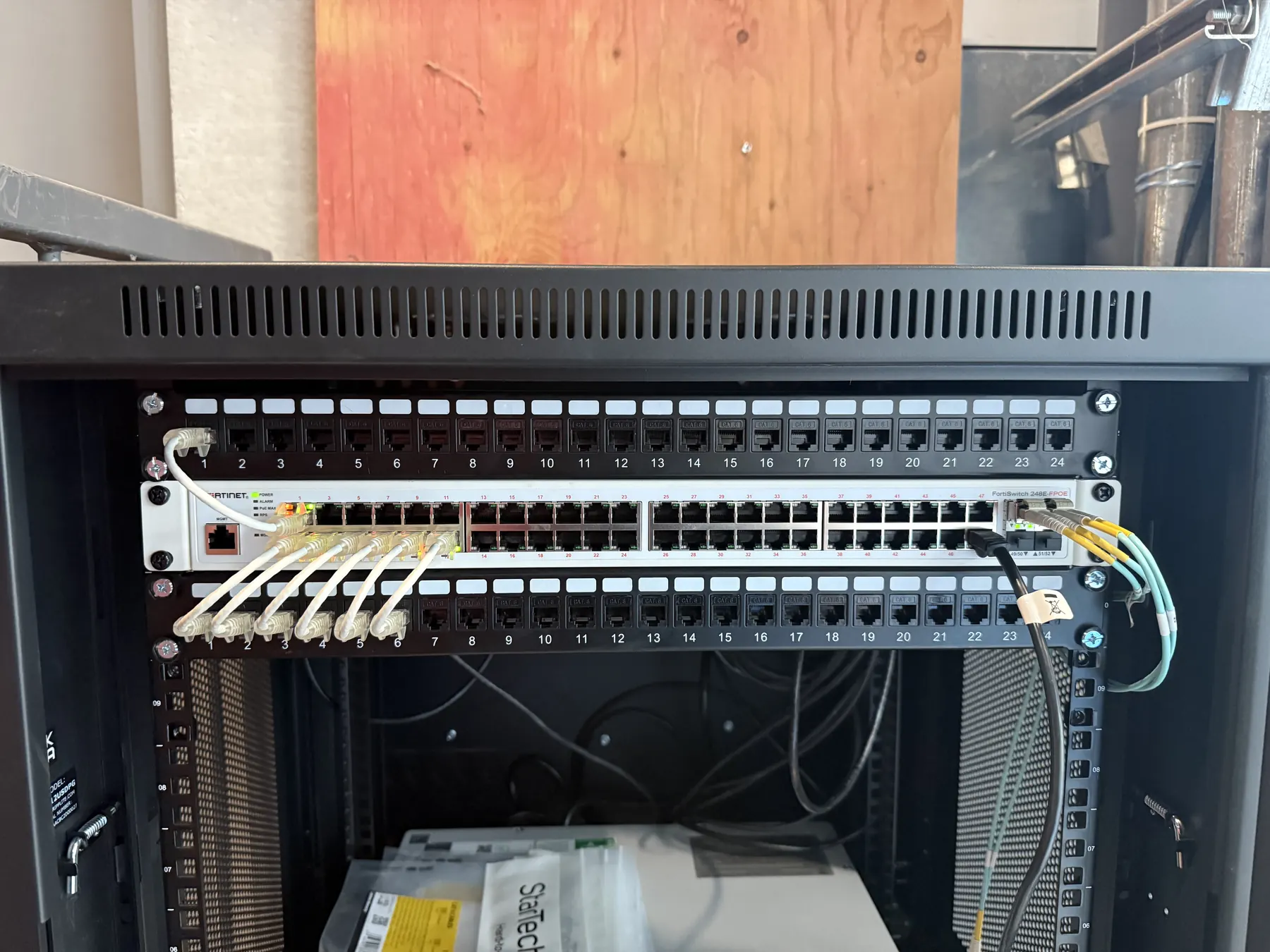
Cable is pulled, terminated on patch panels and labelled, and the switch and patch cords are dressed neatly in the rack.
Test and handover
Every run is tested, the access points are set up and checked for coverage, and the labelled rack shows what goes where.
Choosing what goes in, and the trade-offs.
Networking has no single product. These are the choices that shape most jobs.
Cat6 or Cat6A
Cat6 handles everyday office, camera and WiFi traffic and is the right cable for most buildings. Cat6A is thicker and costs more, but carries faster speeds over the full length of a run, which suits busy offices and anything you expect to upgrade.
PoE switches
A PoE switch sends power down the same cable as the data, so cameras, access points, phones and card readers need no outlet of their own. We size the switch to the number of devices and the power they draw, with room left to add more.
WiFi access points
Access points mounted on ceilings or walls and wired back to the switch cover a building far better than a single router. Where they go matters more than how many there are, so we place them around the walls, floors and spots people actually use.
Racks and patch panels
Every cable lands on a labelled patch panel in a rack or wall cabinet, so moving a device or tracing a problem takes minutes instead of an afternoon. Fibre can link racks between floors or buildings where copper runs out of distance.
What networking costs, and what drives it.
Every networking quote is built from the building, so there is no single price. These are the things that move the number.
- Number of dropsEach cable run to a camera, desk, reader or access point is cable, labour and a port, so the count is the biggest factor.
- The buildingOpen and drop ceilings make runs quick. Finished walls, concrete, multiple floors and runs to outbuildings take more labour.
- Cable typeCat6 suits most jobs. Cat6A costs more per run, and fibre is only needed for long distances between racks.
- SwitchingThe number of ports and the PoE power your devices draw decide the size of the switch.
- WiFi coverageThe number of access points depends on the size, layout and building materials, not just the square footage.
- Rack and cleanupA new rack or wall cabinet, or tidying, relabelling and removing dead cable from an existing one.
You get the price in plain terms before anything is ordered. Send a few details through the quote form or call (647) 572 9613.
Network and wiring work we have done.
Service areas
Networking in Kitchener, Waterloo, Cambridge, Milton and Guelph.
Kitchener
Kitchener is home base for us. A lot of networking work here is in older commercial buildings downtown and along the main corridors, where years of add-ons have left a closet full of unlabelled cable, and in light industrial units where the office needs WiFi that reaches the shop floor. Cleaning up and relabelling an existing rack is often the first step before anything new goes in.
Waterloo
Waterloo's tech offices, startups and shared workspaces lean heavily on reliable wired and wireless networks, and tenants change often. Fitting a space so every desk, access point and camera has a labelled run back to a patch panel makes the next move-in or reshuffle quick. Rental owners often want dependable WiFi in every unit as well.
Cambridge
Cambridge has older stone and brick buildings in Galt, Preston and Hespeler, where getting cable between floors takes planning, and a large industrial base near Highway 401, where warehouses need WiFi across big open floors and long cable runs out to cameras on the yard.
Milton
Milton's newer business parks and plazas, and its many newer homes, usually make cable runs easier, with open ceilings in commercial units and accessible attics in houses. Homeowners often want whole-house WiFi from several access points instead of a single router, plus wired runs to cameras and the TV.
Guelph
Guelph's mix of downtown offices in older buildings, industrial parks and homes in the south end means networking jobs range from untangling an overloaded closet to wiring a new unit from scratch. Where a business runs cameras and card access, we can keep them on their own switch, apart from the office network.
Also serving
- Bradford
- Brampton
- Burlington
- Fergus
- Hamilton
- London
- Mississauga
- Oakville
- Orangeville
- Woodstock
Networking questions.
How much does it cost to run network cable?
It depends on the building. The number of cable runs, how easy the ceilings and walls are to get through, the cable type, the switch and the number of WiFi access points all move the price. We walk the building first and give you the price in plain terms before anything is ordered.
Is Cat6 or Cat6A better?
Cat6 handles everyday office, camera and WiFi traffic and is the right cable for most buildings. Cat6A costs more and is thicker to run, but carries faster speeds over the full length of a run, so it suits busy offices and networks you expect to upgrade.
How many WiFi access points do I need?
It depends on the layout and the building materials more than the square footage alone. Concrete, brick and metal block WiFi far more than drywall. We place access points around how the space is actually used and check the coverage once they are installed.
What is a PoE switch?
A PoE switch sends power down the same network cable as the data, so cameras, access points, phones and card readers do not need an outlet of their own. We size the switch to the number of devices and the power they draw, with room to add more.
Can you clean up and organize our existing network cabling?
Yes. We can trace, test and relabel existing cable, land it neatly on patch panels and remove dead runs, before adding anything new.
Do you install networking for homes?
Yes. Homeowners usually want WiFi that reaches the whole house and wired connections for cameras, TVs and the alarm, all tidied into one small cabinet.
Get a networking quote.
Tell us about the property and we will come back with a system and a price. No pressure and no hard sell.